
The best monitor in 2026 is not one screen — it is one of about half a dozen, depending on whether your desk hosts spreadsheets, games, design files, a console, or a laptop that travels. This guide is the map to all of them. Every recommendation below comes from our hands-on buying guides (each fully updated and re-verified for 2026), so you can start here for the short answer and follow through for the full comparison.
The short version: 2026 is the best year yet to buy a monitor. QD-OLED panels dropped into mid-range pricing, 180Hz replaced 144Hz as the value baseline for gaming, true 4K panels now start under $250, and USB-C docking reached almost every category. Whatever you spent last decade, the same money buys dramatically more now.
Quick Answer: The Best Monitors in 2026
- Best overall (work + everything): ASUS ProArt PA278CV — 27" 1440p, factory-calibrated, USB-C dock
- Best gaming value: Samsung Odyssey G5 G50D — 27" 1440p IPS at 180Hz
- Best premium gaming: Alienware AW3423DWF — 34" QD-OLED ultrawide
- Best budget 4K: Philips 27E1N5900R — 4K IPS with USB-C 65W
- Best cheap work monitor: Dell S2725HS — 27" 100Hz, ~$130
The 2026 monitor market in four sentences
OLED stopped being a luxury: the Alienware AW3423DWF brought QD-OLED ultrawides to ~$700, and 27 inch OLED panels now fight 1440p LCDs on price. High refresh became standard equipment — office monitors ship at 100–120Hz and gaming panels at 180–280Hz for budget money. 4K stopped being a stretch: three of our current picks deliver genuine 3840×2160 IPS under $300. And USB-C with power delivery moved down-market, so one cable now docks a laptop to screen, power, and peripherals at price points that used to be USB-A-only.
Best monitors by use case
Work and home office
For documents, calls, and browser-heavy days, prioritize pixel density, eye comfort, and a stand that adjusts. The ASUS ProArt PA278CV is our overall pick — sharp 1440p, Calman Verified color, and a 65W USB-C dock — while the Dell S2725HS covers tight budgets at ~$130 with 100Hz and TUV eye comfort. The full rundown, including 24 inch options and vertical sidecar screens, lives in our 24 inch home office guide and 27 inch monitor guide.
Gaming
The value story of 2026 is the Samsung Odyssey G5 G50D: a 27 inch 1440p IPS at 180Hz for around $200 — specs that cost double two years ago. Competitive players chasing 240Hz+ should read our high-refresh gaming guide and gaming monitors under $300 roundup; budget-first shoppers can start with the budget gaming monitors guide.
Graphic design and photo editing
Color accuracy is the whole game. The ASUS ProArt PA248QV brings factory Calman Verified calibration to ~$230, and the Philips 27E1N5900R adds true 4K plus USB-C for detail-heavy work. Our budget monitors for graphic design guide compares all six current picks and includes a full calibration walkthrough.
Console gaming (PS5 / Xbox Series X)
Consoles want 4K at 120Hz over HDMI 2.1-class bandwidth. The ASUS TUF VG27UQ1A (4K 160Hz) doubles as a top-tier PC gaming panel, and our 4K console gaming guide covers the console-specific requirements, from VRR to the HDMI bandwidth trap.
Portable and laptop-second-screen
A $90–210 USB-C portable doubles a laptop’s workspace anywhere. The Lenovo ThinkVision M14 is the premium pick; the ARZOPA A1 proves usable second screens now cost under $100. Mac users should see our portable monitors for MacBook Pro guide, and everyone else the cheap portable monitors guide.
Best monitors by size
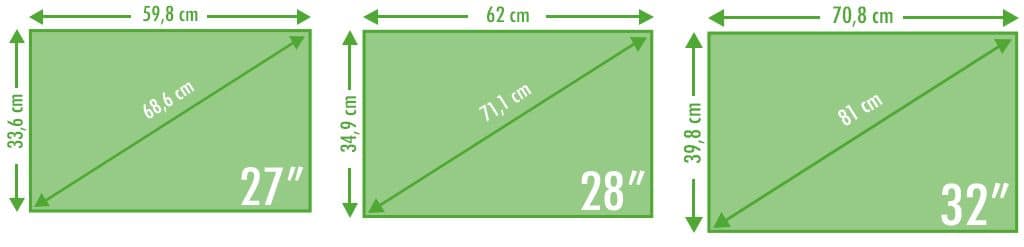
Size is the other half of the decision — it sets both your desk footprint and the resolution that makes sense:
| Size | Typical resolution | Pixel density | Best for | 2026 price range |
|---|---|---|---|---|
| 24 inch | 1920×1080 | ~92 PPI | Sharp budget work, esports | $90–200 |
| 27 inch | 2560×1440 | ~109 PPI | The all-round sweet spot | $130–300 |
| 29 inch | 2560×1080 (21:9) | ~96 PPI | Ultrawide on small desks | ~$230 |
| 34 inch | 3440×1440 (21:9) | ~110 PPI | Multitasking, immersion, QD-OLED | $230–950 |
| 49 inch | 5120×1440 (32:9) | ~109 PPI | Sim racing, trading, power users | $700+ |
24 inch: the sharp budget classic
1080p at 24 inches stays properly sharp at desk distance, prices are the lowest in the market, and esports players still prefer the compact field of view. Best starting point: our 24 inch home office guide. Coders and writers should also consider a 24 inch rotated to portrait — see the vertical monitor guide.
27 inch: the default answer
1440p at 27 inches is the pixel-density sweet spot — crisp text, no scaling headaches, and every category (work, gaming, 4K, esports) has strong models here. Start with the best 27 inch monitors guide.
29 inch: the compact ultrawide
21:9 multitasking on a small-desk footprint. The honest guide — one current pick (the LG UltraWide 29U511A), plus when 27 or 34 inch is smarter — is in our 29 inch monitor guide.
34 inch: the multitasker’s canvas
3440×1440 curved ultrawides replace dual-monitor rigs and now start around $230. The full ladder — budget VA, IPS, USB-C docks, QD-OLED — is in our 34 inch ultrawide guide; MacBook users get the docking-specific picks in the ultrawide for MacBook guide. The Sceptre 34 inch curved is the budget entry, the Samsung ViewFinity S65UA the USB-C work pick, and the Alienware AW3423DWF the QD-OLED prize.
49 inch super ultrawide: the specialist
32:9 screens suit sim racing, trading layouts, and anyone who wants two monitors without a bezel. They need a deep desk and a strong GPU — the tradeoffs are in our super ultrawide guide.
What actually matters when buying in 2026
Panel: IPS is the default, OLED is the upgrade
IPS panels deliver consistent color and wide angles — the right call for work and most gaming (our IPS explainer covers why). VA trades color consistency for contrast at budget prices; our IPS vs VA guide settles that debate for casual users. QD-OLED (Alienware) is the genuine upgrade: perfect blacks and 0.1ms response, now from ~$700.
Refresh rate: 100Hz is the floor
Do not buy 60Hz in 2026 — office panels now ship at 100–120Hz and gaming at 180–280Hz. What the numbers mean (and why adaptive sync matters even at 100Hz) is in our refresh rate explainer.
Resolution: match pixels to size and GPU
1080p suits 24 inches, 1440p is the 27 inch sweet spot, 4K rewards 27–32 inch creators and console players. Gamers should also match resolution to GPU power — our 4K under $400 guide covers the budget 4K reality.
USB-C: one cable changes your desk
A USB-C monitor with power delivery is a laptop dock in disguise — video, charging, and peripherals over one plug. The connector details are in our USB-C adapter guide, and the cable bandwidth math in HDMI vs DisplayPort.
Ergonomics and comfort
Height adjustment, flicker-free dimming, and correct placement decide whether eight-hour days hurt. Our ergonomic desk setup guide covers the measurements; the workstation setup hub covers the whole desk. Curved or flat? The curved vs flat comparison has the answer by size.
Frequently asked questions
How much should I spend on a monitor in 2026?
$150–300 covers most people completely: a 100Hz 27 inch work screen or a 180Hz 1440p gaming panel. $300–500 buys factory calibration or true 4K. Above that you are paying for OLED, ultrawide canvas, or reference-grade color — worth it only when your work or hobby demands it.
Is an OLED monitor worth it?
For gaming and media, yes — the QD-OLED experience (true blacks, 0.1ms, real HDR) has no LCD equal, and prices have fallen dramatically. For static productivity work, a calibrated IPS is smarter: cheaper, brighter, and no burn-in considerations with static UI.
Is 27 inch better than 24 inch?
For most people, yes — more workspace at a still-comfortable distance, especially at 1440p. 24 inch wins on pure 1080p sharpness, price, and esports field of view. Both are covered in the size sections above.
Do I need a 4K monitor?
Only if your work is detail-critical (photo, video, print-adjacent) or you want maximum desktop space with scaling. At 27 inches, 1440p remains the better all-round value; 4K now costs barely more if you want it — see the 4K under $400 guide.
Curved or flat monitor?
Curves genuinely help at ultrawide sizes (34 inch and up) and add immersion at 1000R gaming panels. At standard 24–27 inch sizes they are a preference, not a benefit — full breakdown in the curved vs flat guide.
Final checklist before you buy
- Size matches your desk depth (34 inch needs ~30 inches; 24–27 inch fits anywhere).
- Resolution matches the size (1080p@24, 1440p@27, 4K@27–32).
- Refresh at least 100Hz for work, 144Hz+ for gaming.
- USB-C with power delivery if a laptop sits on this desk.
- IPS panel (or QD-OLED if budget allows) — skip TN entirely.
- Height-adjustable stand or a VESA mount planned in.
Picked your screen? Build the rest of the desk around it with our workstation setup guides — ergonomics, mounting, and cabling, all in one place.


