

The best budget gaming monitor in 2026 is the AOC 24G4 — a 24 inch 1080p Fast IPS panel running at 180Hz for around $130. Specs that cost $300 just two years ago now define the entry tier, and every pick in this guide delivers 100Hz or better, adaptive sync, and modern panel quality.
Budget no longer means settling. This updated roundup replaced every discontinued 2019–2020 model from the previous version with six current, verified monitors spanning $130–$300: fast 1080p esports panels, a 280Hz curved screen, true 1440p value, two ultrawides, and even a budget 4K. Whatever your GPU and desk size allow, there is a genuinely good cheap gaming monitor here.

Quick Answer: Best Budget Gaming Monitors in 2026
- Best overall: AOC 24G4 — 24" 1080p Fast IPS at 180Hz
- Best cheap high refresh: AOC C27G4ZH — 27" curved 1080p at 280Hz
- Best 1440p value: Samsung Odyssey G5 G50D — 27" 1440p IPS at 180Hz
- Best small ultrawide: LG UltraWide 29U511A — 29" 21:9 IPS at 100Hz
- Best big ultrawide: AOC CU34G2X — 34" 1440p curved at 144Hz
- Best budget 4K: Sceptre Prime 4K — 27" 4K IPS at 70Hz
Comparison table of the best budget gaming monitors
| Monitor | Panel | Resolution | Refresh rate | Sync | Best for |
|---|---|---|---|---|---|
| AOC 24G4 | 24" Fast IPS | 1920×1080 | 180Hz | Adaptive-Sync | All-round budget gaming |
| AOC C27G4ZH | 27" VA 1500R curved | 1920×1080 | 280Hz (DP) | FreeSync Premium | Cheap esports speed |
| Samsung G5 G50D | 27" IPS | 2560×1440 | 180Hz | G-Sync compatible | Sharp 1440p on a budget |
| LG UltraWide 29U511A | 29" IPS 21:9 | 2560×1080 | 100Hz | AMD FreeSync | Small-desk ultrawide |
| AOC CU34G2X | 34" VA 1500R curved | 3440×1440 | 144Hz | FreeSync | Immersive big screen |
| Sceptre Prime 4K | 27" IPS | 3840×2160 | 70Hz (DP) | — | Console and 4K desktop |
1. AOC 24G4 — best budget gaming monitor overall
| Key specs | |
|---|---|
| Panel | 24" Fast IPS, 1920×1080 |
| Refresh rate | 180Hz |
| Response time | 1ms, HDR ready |
| Ports | DisplayPort 1.4, HDMI, Adaptive-Sync |
The 24G4 is what a budget gaming monitor should be in 2026: a proper Fast IPS panel (not a washed-out TN) at 180Hz, with clean 1ms-class response and adaptive sync for any modern GPU. At 24 inches, 1080p is properly sharp at desk distance, and the compact footprint fits almost any setup.
If you buy one cheap gaming monitor and want zero regrets, this is it. Esports players get the frame rates; everyone else gets a panel that still looks great in single-player games and daily work. More options just above this tier are ranked in our gaming monitors under $300 guide.
Pros: exceptional price-to-performance; Fast IPS color; 180Hz everywhere via DP 1.4.
Cons: tilt-only stand; no USB hub.
2. AOC C27G4ZH — best cheap high-refresh gaming monitor
| Key specs | |
|---|---|
| Panel | 27" VA, 1500R curved, 1920×1080 |
| Refresh rate | 280Hz (DisplayPort), 240Hz (HDMI) |
| Response time | 0.3ms MPRT |
| Extras | FreeSync Premium, height-adjustable stand, HDR ready |
280Hz at a budget price — that is the headline, and it is not a compromise-laden TN either: the C27G4ZH uses a 1500R curved VA panel with a height-adjustable stand. For Valorant, CS2, and Overwatch players on modest budgets, this is the cheapest credible route to pro-tier motion clarity.
The honest tradeoff of budget VA: dark-scene transitions can smear slightly, and 1080p at 27 inches is less pixel-dense than 1080p at 24 (see the IPS vs VA comparison for the full picture). Competitive players will not care — the 280Hz bump is worth more than color perfection. If you want similar speed on IPS, our 240Hz monitor guide covers the step-up options.
Pros: 280Hz for budget money; curved immersion; height-adjustable stand.
Cons: VA smearing in dark scenes; 1080p stretched across 27 inches.
3. Samsung Odyssey G5 G50D — best budget 1440p gaming monitor
| Key specs | |
|---|---|
| Panel | 27" IPS, 2560×1440 |
| Refresh rate | 180Hz |
| Response time | 1ms GTG |
| Extras | HDR400, G-Sync compatible, height-adjustable stand |
Around $200 buys true 1440p at 180Hz on an IPS panel with HDR400 and a height-adjustable stand — the G50D is the budget tier’s quality jump. 1440p at 27 inches is the pixel-density sweet spot (~109 PPI), so text is crisp, and games gain real detail over 1080p.
Pick it if your GPU handles 1440p (RTX 4060-class and up) and you want one screen for gaming plus everything else. It is the same value pick that tops our IPS gaming monitor guide, and it slots neatly into any of the layouts in our 27 inch monitor roundup.
Pros: 1440p/180Hz IPS at a budget price; sharp text; solid stand.
Cons: HDR is basic; no USB-C.
4. LG UltraWide 29U511A — best budget ultrawide for small desks
| Key specs | |
|---|---|
| Panel | 29" IPS, 21:9, 2560×1080 |
| Refresh rate | 100Hz |
| Extras | AMD FreeSync, HDR10, 99% sRGB |
Ultrawide immersion used to start at $400; the 29U511A brings it under $250. The 21:9 canvas at 2560×1080 on a small-desk footprint is the cheapest legitimate way to get peripheral vision in racing and flight games, plus a genuinely wider desktop for work.
100Hz is modest by 2026 standards but a big step over 60Hz, and the IPS panel keeps colors consistent across the wide viewing angles. It is the main pick of our 29 inch monitor guide, which also explains when a 27 inch 16:9 is the smarter buy.
Pros: cheapest good ultrawide; IPS color; 100Hz fluidity; small-desk friendly.
Cons: 1080p-wide resolution means lower pixel density; 100Hz cap.
5. AOC CU34G2X — best big-screen budget ultrawide
| Key specs | |
|---|---|
| Panel | 34" VA, 1500R curved, 3440×1440 |
| Refresh rate | 144Hz |
| Response time | 1ms MPRT |
| Extras | FreeSync, frameless design |
The CU34G2X has been the budget ultrawide benchmark for years because nothing else touches its formula: 3440×1440 of curved VA screen at 144Hz for around $300. That is sim racing, immersive single-player, and a full work canvas in one purchase.
VA contrast makes dark games look genuinely cinematic, and 3440×1440 at 34 inches keeps pixel density reasonable. It remains the value pick in our 34 inch ultrawide guide; if your desk is shallower, the 29U511A above is its compact sibling. Also worth reading: the curved vs flat breakdown before you commit to 1500R.
Pros: unbeatable $300 ultrawide spec; VA contrast; 144Hz smoothness.
Cons: needs a deep desk (~30 inches); VA smearing in fast dark scenes.
6. Sceptre Prime 4K — best budget 4K gaming monitor
| Key specs | |
|---|---|
| Panel | 27" IPS, 3840×2160 |
| Refresh rate | 70Hz over DisplayPort |
| Extras | 100% sRGB, built-in speakers |
A true 4K IPS panel for roughly $200 — the Sceptre Prime (U275W-UPT) is the budget 4K entry for console players and single-player gamers who prioritize image detail over frame rate. At 27 inches, 4K delivers ~163 PPI: razor-sharp UI, films, and photos.
Be clear about the tradeoff: 70Hz is not for esports, and PC gamers with mid-range GPUs will feel more benefit from a 1440p/180Hz panel (the G50D above). But for a PS5 or Xbox Series X desk where 4K clarity matters more than 120Hz, or for a work-plus-casual-gaming screen, this is remarkable money. Console-specific picks are compared in our 4K console gaming guide.
Pros: cheapest respectable 4K IPS; 100% sRGB; speakers included.
Cons: 70Hz ceiling; basic stand; no VRR certification.
Budget gaming monitor buying guide
Size?
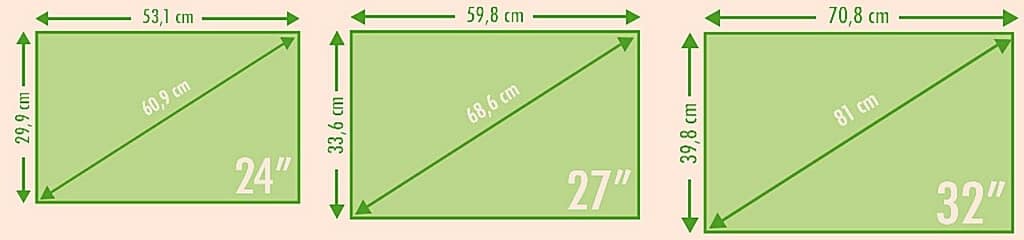
At 1080p, 24–25 inches is the sweet spot — smaller screens keep pixels dense and frame rates high. Move to 27 inches only with 1440p. Ultrawide 29 and 34 inch screens trade pixel density for field of view. The full size-to-resolution math lives in our monitors hub.
Aspect ratio

16:9 remains the competitive standard — every esports title is tuned for it. 21:9 adds immersion and desktop width at a frame-rate cost, and some competitive titles restrict it. Casual and single-player gamers get the most from 21:9; ladder climbers should stay 16:9.
Resolution
1080p maximizes frame rates per dollar; 1440p is the quality jump worth making at $200; 4K only makes budget sense for console players or work-first desks (the Sceptre Prime). Match resolution to GPU power — our refresh rate guide shows why frames beat pixels for gaming feel.
Response time

Every pick in this guide advertises 1ms-class response (0.3ms MPRT on the C27G4ZH refers to backlight strobing, not full pixel transitions). What matters is tuned overshoot across the refresh range — all six picks here handle it acceptably at their rated refresh.
Panel type: TN vs IPS vs VA
IPS is the default: consistent color, wide angles, and modern Fast variants that are quick enough for esports. VA buys contrast and cheap curved 280Hz screens at the cost of dark-scene smearing. TN has effectively disappeared from the worthwhile budget tier — the TN panel explainer covers why it lost. Deeper panel comparisons: what is an IPS monitor and IPS vs VA.
Refresh rate
The 2026 budget floor is 100Hz (ultrawide exception), with 180Hz standard under $200 and 280Hz reachable under $200 for esports specialists. The jump 60→180Hz transforms gaming feel; 180→280Hz is a smaller, competitive-focused gain. Details in the highest refresh rate explainer.
G-Sync, FreeSync, and G-Sync compatible
All three describe adaptive-sync VRR; every monitor in this guide works across NVIDIA and AMD cards. FreeSync Premium adds low-frame-rate compensation, which matters most at budget GPUs that dip below the panel’s range — the adaptive sync guide explains the certifications.
Connectivity
Budget panels ship with HDMI plus DisplayPort; use DisplayPort first on PC (it unlocks the top refresh rate — the C27G4ZH runs 280Hz on DP but 240Hz on HDMI), HDMI for consoles. Cable bandwidth limits are tabulated in our HDMI vs DisplayPort guide.
Frequently asked questions on the best budget gaming monitors
How much do cheap gaming monitors cost?
In 2026, genuinely good gaming starts at ~$130 (180Hz Fast IPS), the value sweet spot is $150–220 (280Hz curved or 1440p/180Hz), and $250–300 buys ultrawide immersion. Below $100 you sacrifice adaptive sync or panel quality — usually not worth it.
What about 4K gaming monitors?
At budget prices, 4K means 60–70Hz (like the Sceptre Prime) — fine for console gaming and cinematic single-player, wrong for competitive PC play. Serious 4K gaming needs 144Hz+ panels like the ASUS VG27UQ1A in our IPS gaming guide, which cost more.
Which monitors are best for gaming?
For budget buyers: the AOC 24G4 for all-round value, the C27G4ZH for esports speed, the Samsung G50D for 1440p quality. For the full market including high-end OLED, start at our best monitors hub.
What resolution and screen tech should I seek in a cheap monitor?
1080p at 24 inches on a Fast IPS panel with 180Hz and adaptive sync — that formula (the 24G4) delivers 90% of the gaming experience at 40% of the price. Spend more only for 1440p sharpness or ultrawide immersion.
How to choose the best budget gaming monitor for you?
Three questions: What GPU do you own (match resolution to its power)? What do you play (esports → refresh rate; single-player → panel quality)? How deep is your desk (ultrawides need 28–30+ inches)? Answer those, then the comparison table above picks for you.
Is a cheap monitor bad for competitive gaming?
Not anymore — the budget tier’s 180–280Hz panels are faster than what pros used five years ago. The AOC C27G4ZH at 280Hz out-specs tournament monitors from 2021 while costing less than half as much.
Conclusion
The 2026 budget gaming tier is the strongest ever: 180Hz Fast IPS from ~$130, 280Hz curved esports panels under $200, sharp 1440p value around $200, and ultrawide immersion from ~$230. Pick the AOC 24G4 if unsure — it is the safest $130 in PC gaming. Then position it right with our ergonomic desk setup guide, and compare the premium alternatives in our under-$300 gaming roundup.


